Creating new tag
To create a new tag, click on the following symbol and then "Add tag":

The table and columns are described via the tags, so that a table consists of one or more tags and each tag stands for a column. It is assumed that each table and column that is created already exists in the specified database. If the column or table does not exist the connector will ignore the whole table, so it will not be able to read or write from it.
Each tag has the following attributes which can be configured:
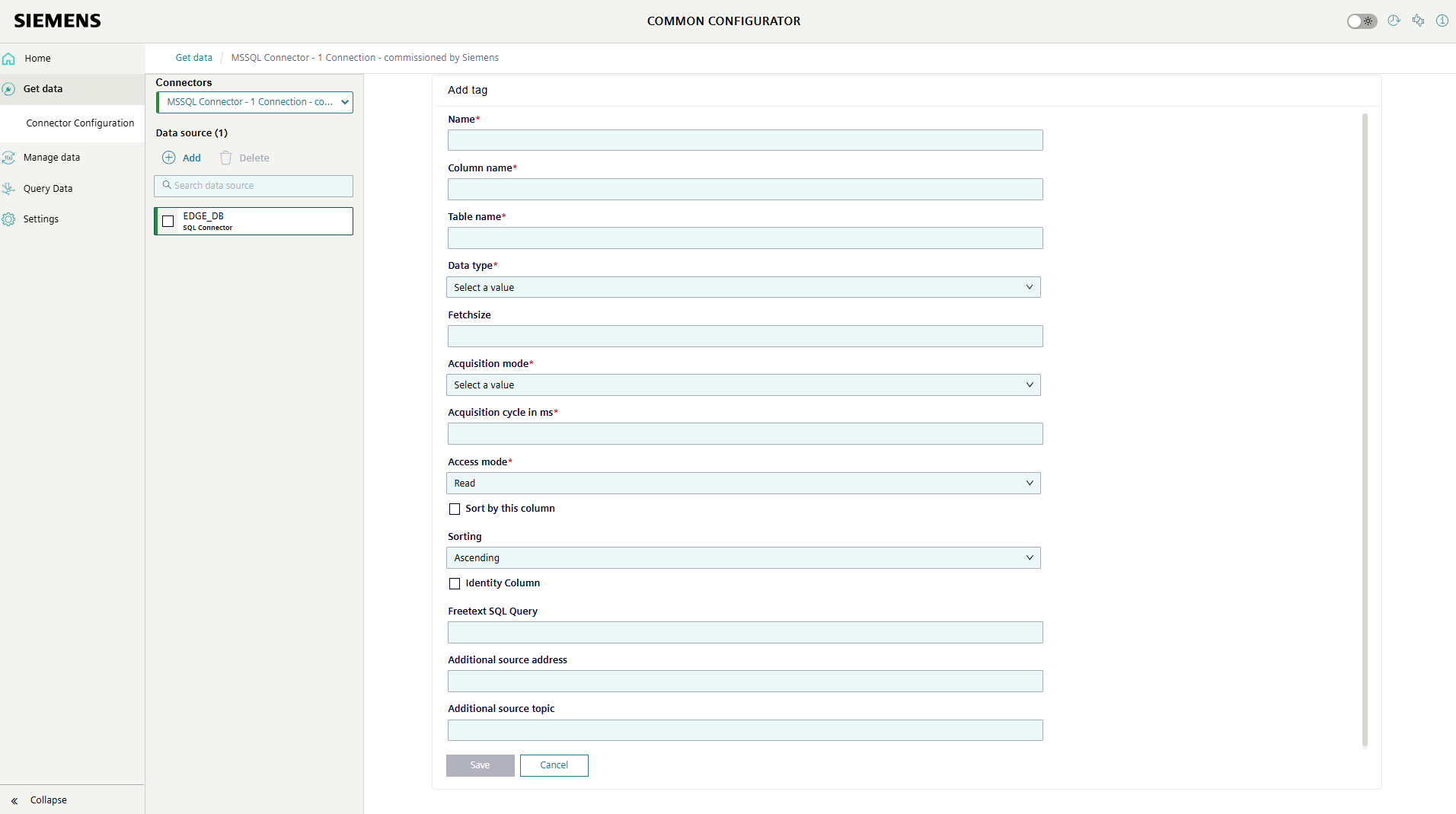
-
Name
Each tag has its own name, which can be freely chosen. Later in the metadata each column (datapoint) gets its own ID (e.g. DP12).
-
Column name
Name of the column. When entering the column name, pay attention to the case sensitivity otherwise the connector will not find the column name in the table for the validation and will set the whole table to invalid, which means it can neither be read from nor written to the table.
-
Table name
Name of the table.
The table name must be entered for each column.
When entering the table name, pay attention to the case sensitivity otherwise the connector will not find the table name in the database for the validation and will set the whole table to invalid, which means it can neither be read from nor written to the table.
-
Data type
The data type that the column has. Currently, only the following data types are supported:
| Common Payload | Datatype SQL Datatype |
|---|---|
| Bool | bit |
| Byte | tinyint |
| Word | int |
| DWord | bigint |
| Real | real |
| DateTime | datetime |
| Date | date |
| String | varchar(max) |
If the acquisition mode is set to "Newest" and the column is used to determine the new rows by comparison, only the following data types are supported to select the function:
| Common Payload | Datatype SQL Datatype |
|---|---|
| Bool | bit |
| Byte | tinyint |
| Word | int |
| DWord | bigint |
| Real | real |
| DateTime | datetime |
| Date | date |
Datetime values are published to MQTT in the defined format in Siemens with Z referring to UTC time zone.
-
Fetchsize
The fetchsize is the number of rows that are read from the table. If the fetchsize is not filled in, all rows are read out.
This value can be entered for each column, but can only differ from table to table. If different values are configured for the same table, the top tag is always used as the configuration.
In our demo, the fetchsize is 100 rows.
-
Acquisition mode
Two reading modes can be selected. One is the "Select" mode, in which the top fetchsize rows are always read out at a certain time interval. On the other hand, the "Newest" mode in which only the top fetchsize values that have not yet been sent are returned.
This value can be entered for each column, but can only differ from table to table. If different values are configured for the same table, the top tag is always used as the configuration.
-
Acquisition cycle
The acquisition cycle is the interval in ms at which the database is read.
This value can be entered for each column, but can only differ from table to table. If different values are configured for the same table, the top tag is always used as the configuration.
In our demo, the acquisition cycle is 5.000 milliseconds.
-
Access mode
Configures the access mode of the table. This value can be entered for each column, but can only differ from table to table. If different values are configured for the same table, the top tag is always used as the configuration.
-
Sort by this column
Designates the selected column as the sorting column. This column must allow for determining the data's recency to ensure the proper functioning of the 'Newest' read mode. Each table should have exactly one column designated as the order column. If none or more than one column is designated, the SQL connector will not read that table.
This column must be a not null column
-
Sorting
Configures whether the table should be sorted in ascending or descending order.
-
Identity Column
Specifies that this column is an AUTO INCREMENT column. The connector will not perform any inserts on columns set to Identity Columns no matter is being received on the write topic.
-
Freetext SQL Query
Freetext to append to the SQL Query. Get's appended to the SQL Query after 'WHERE'. Only use ORDER BY if the primary sorting attribute is false.
The optional
Additional source addressandAdditional source topicfields enables you to define the address of the additional external source of data to send values via this tag to the defined column. For further information please check the Browsing API feature
-
Additional source address
The additional external tag's address, which must be in this format: "connection.datapoint.tagId".
-
Additional source topic
The additional external topic, which is the topic that delivers the data message of the additional source address.
Once the data source and associated tags have been configured, these configurations can be deployed to the edge device.
