Browsing API
Siemens Edge Connectors support an auto-discovery feature for the tags. We have implemented the Browsing API into the newest version of the Generic SQL Connector.
This opens up the Browse Button:

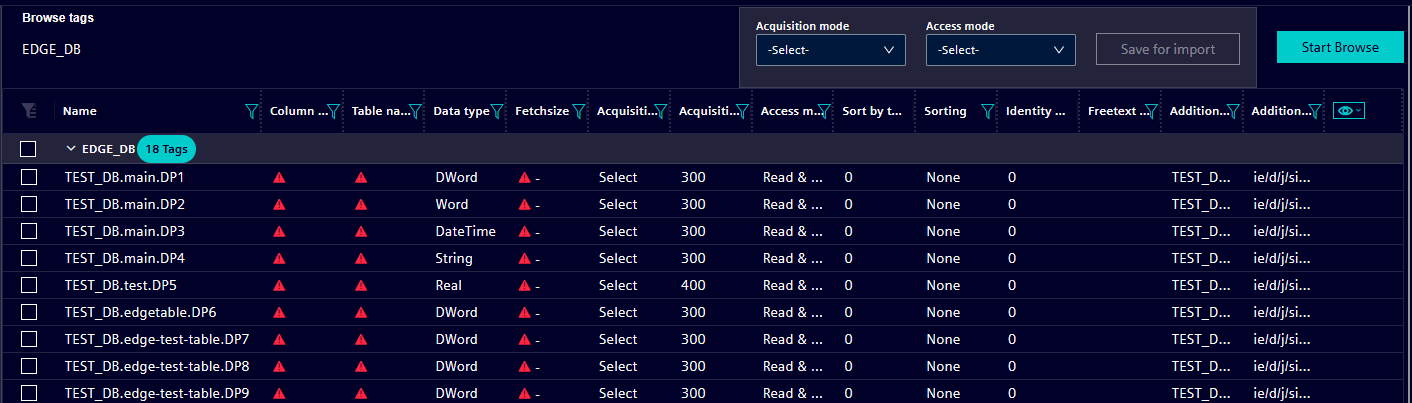
This is how the found tags will look like after browsing, the browsing button will search for all meta data messages, and extract all the tags. The naming scheme is as follows: "connection.datapoint.tagId".
Users will have to manually configure the fetchsize, as well as the column and table name of every datapoint they add to their datasource. All datapoints sent on this topic will show up after clicking the Browse button and can be selected for the datasource.
However, the configured MQTT user has to have access to all the topic the user wants to browse the data from, otherwise they will not appear.
It is important that the databus service name is correct and matches the one set in the Databus with the correct port. The databus username and password are the ones that are set in the settings of the Common Configurator. The fields "databus_service_name", "databus_username" and "databus_password" have been added to the datasource. These are used to ensure proper MQTT configuration to browse tags.
If the datatype is not supported by the connector (see Dataypes), it will be left empty so the user can select one of the supported types.

Browsing Datasource's fields:
Two new fields have been added as a part of the browsing API. They are used to identify where the additional source of data is from (address) and on which topic (topic). These are "Additional source address" and "Additional source topic".

-
Additional Source Address
This field enables you to define the address of the additional source of data to send values via this tag to the defined column. The format of the address isconnection.datapoint.tagId,payload: {
"seq": 0,
"vals":
[
{
"id": "DP1",
"val": 4444
}
]
}If the data message payload is defined like this, then Additional Source Address will contain the tag id in it i.e.
connection.datapoint.DP1. -
Additional Source Topic
This is the topic that delivers the data message of the additional source address. For exampleie/d/j/simatic/v1/sqlc1/dp/w/.